
HubSpot vs. Salesforce Overview
HubSpot and Salesforce offer highly customizable CRM solutions that can handle large customer databases. HubSpot’s CRM is available as part of its free tools, though teams will need to opt for the Sales Hub, Marketing Hub or some combination of Hubs to get full functionality from the platform.
Salesforce doesn’t offer a free option, but its Cloud products are comparable to HubSpot’s Hubs. The Sales Cloud will deliver the bulk of the platform’s CRM functionality.
Salesforce vs. Hubspot Comparison
Salesforce and HubSpot offer similar features and integration options, with a few key differences. And while their features are broken down into similar product offerings, pricing can vary greatly. Here, we’ve broken down the major differences.
Features
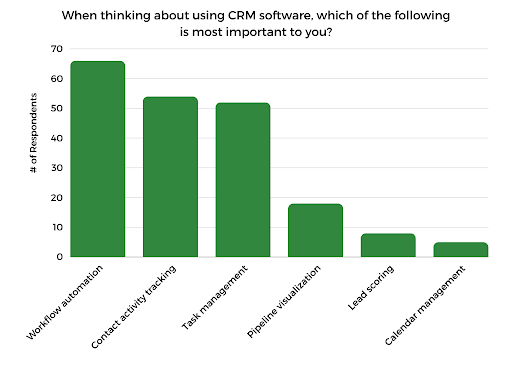
When we surveyed CRM users, they said workflow automation, contact activity tracking and task management were the most important features. We used these insights to guide us in comparing these platforms based on top features like these.
Both options offer similar feature sets across products and plans, with basic contact management and workflow automation being standard. However, you’ll need to opt for advanced plans for features like lead scoring or extended support options.
| HubSpot | Salesforce | |
| Contact Management | ✅ | ✅ |
| Workflow Automation | ✅ | ✅ |
| Pipeline Management | ✅ | Enterprise, Unlimited, Einstein 1 |
| File Storage | Up to 2GB | Up to 10GB |
| AI Tools | ✅ | ✅ |
| Mass Email | ✅ | ✅ |
| Analytics | ✅ | ✅ |
| Custom Dashboards | ✅ | ✅ |
| Lead Scoring | Enterprise plan only | Unlimited, Einstein 1 |
| Phone Support | Enterprise and Professional plan only | ✅ |
| Live Chat Support | ✅ | ✅ |
Pricing
Salesforce and HubSpot have fairly complex CRM pricing options, considering the different products you can choose from. Salesforce also has a long list of potential add-ons that are great for customization but only further complicate pricing. Most CRM features relevant to most teams will be included in both providers’ “starter” plans or their specific sales and marketing products.
Keep in mind that while HubSpot tends to have lower starter pricing, they do require teams to pay an initial one-time onboarding fee. Depending on your chosen plan, this fee can range from $1,500 to $7,000.
Hubspot Pricing
Salesforce’s Starter Suite and Hubspot’s Customer Platform are similar in offering a “sampling” of top features from across their products. These are also likely the most affordable options based on per-user pricing. HubSpot’s Customer Platform has lower starter pricing, with flat monthly pricing available for more advanced features. You may not find certain advanced CRM features included in these plans, but they can be a great option for small businesses or those just starting out. We cover HubSpot’s pricing options in more depth in our HubSpot Pricing Guide.
| Hub | Plan | Price |
| HubSpot Customer Platform | Free Tools | $0 |
| Starter | $20/user/month | |
| Professional | $1,300/org/month (5 seats) | |
| HubSpot Sales Hub | Free Tools | $0 |
| Starter | $20/user/month | |
| Professional | $100/user/month | |
| Enterprise | $150/user/month | |
| HubSpot Marketing Hub | Free Tools | $0 |
| Starter | $20/user/month | |
| Professional | $890/org/month (Up to 3 users) | |
| Enterprise | $3,600/org/month (up to 5 users) |
Salesforce Pricing
Both Salesforce and HubSpot offer specific products for marketing and sales. If a starter plan doesn’t cover your needs, these sales products are likely your best options for key CRM features. Salesforce’s starter pricing tends to be higher across the board, though both HubSpot and Salesforce offer per-organization pricing for higher-tier plans. We go into much more detail about Salesforce’s pricing options in our Salesforce Pricing Guide.
| Product | Plan | Price |
| Salesforce Small Business Suite | Starter Suite | $25/user/month |
| Pro Suite | $100/user/month | |
| Salesforce Sales Cloud | Enterprise | $165/user/month |
| Unlimited | $330/user/month | |
| Einstein 1 Sales | $500/user/month | |
| Salesforce Marketing Cloud | Marketing Cloud Pro | $1,250/org/month |
| Marketing Cloud Corporate | $4,200/org/month | |
| Marketing Cloud Enterprise | Custom |
Integrations
A significant plus of Salesforce and HubSpot is their extensive integration options. Compared to most other CRM systems, you’ll have a good chance of finding niche or industry-specific integration options with well-known products like these. HubSpot’s App Marketplace makes searching for the integrations you need easy. The same goes for the Salesforce AppExchange marketplace.
We easily found common integrations within both platforms. However, we recommend researching specific integration options if you need particular capabilities.
| Integration | Salesforce | HubSpot |
| Microsoft Outlook | ✅ | ✅ |
| Gmail | ✅ | ✅ |
| Google Calendar | ✅ | ✅ |
| Facebook Ads | ✅ | ✅ |
| Zoom | ✅ | ✅ |
| Slack | ✅ | ✅ |
| Canva | ✅ | ✅ |
| Eventbrite | ✅ | ✅ |
| Shopify | ✅ | ✅ |
| Stripe | ✅ | ✅ |
| SurveyMonkey | ✅ | ✅ |
| PandaDoc | ✅ | ✅ |
| DocuSign | ✅ | ✅ |
| Trello | ✅ | ✅ |
| Asana | ✅ | ✅ |
| Zapier | ✅ | ✅ |
Customer Support
HubSpot and Salesforce differ in their customer support options. Expect to have different levels of support depending on the plan you choose. In Salesforce’s case, you’ll have the option to upgrade to a higher Customer Success plan. HubSpot doesn’t require a separate support plan. However, lower-level plans will have limited support options.
Salesforce CRM Customer Support
Salesforce requires teams to add a Customer Success plan for access to customer support. The Standard plan is included in all licenses and gives all users access to 24/7 tech support and community support from the Trailblazer forums.
Teams must opt for at least the Premier Success plan for onboarding support. For a dedicated Customer Success Manager, you’ll need to spring for the Signature Success Plan, including personalized onboarding for the first month.
Pricing for the Premier Success plan is 30% of your license costs. Signature Plan pricing is custom. Therefore, it is difficult to estimate your costs before speaking to a sales representative.
| Standard Success Plan | 24/7 tech support Trailblazer community support |
| Premier Success Plan | Three onboarding sessions and 90-day check-in 24/7 tech support Trailblazer community support |
| Signature Success Plan | Designated Customer Success Manager Personalized onboarding and workshops within the first 30 days 24/7 tech support Trailblazer community support |
HubSpot CRM Customer Support
Paid HubSpot plans include customer support in some capacity. Those using HubSpot for free will not be eligible for live support and will need to rely on the HubSpot knowledge base or community support forums. Phone support is only available for Enterprise customers, which is something to keep in mind if your team prefers to call rather than chat or email.
| Free Tools | Knowledge base Community support |
| Starter | Chat support Knowledge base Community support |
| Professional | Email support Chat support Knowledge base Community support |
| Enterprise | Phone support Email support Chat support Knowledge base Community support |
Who Is HubSpot Best For?
HubSpot is likely better suited to small teams that could benefit from its Customer Starter Platform, which offers more affordable pricing and enough functionality to work as a long-term solution without committing to more expensive multi-year contracts. HubSpot’s cross-functional sales and marketing tools are also a major plus for teams that are looking to streamline marketing tasks like mass email sends and monitor sales pipelines.
Who Is Salesforce Best For?
Salesforce is considered one of the most powerful software options on the market, and it’s best for teams that need a lot from their CRM software. Larger sales teams that want to store contact information that is easily accessible to representatives will find that Salesforce can do it all. Implementation is intensive because Salesforce can be customized to your team’s exact needs, with many add-on options and other ways to personalize it.
How to Choose a CRM
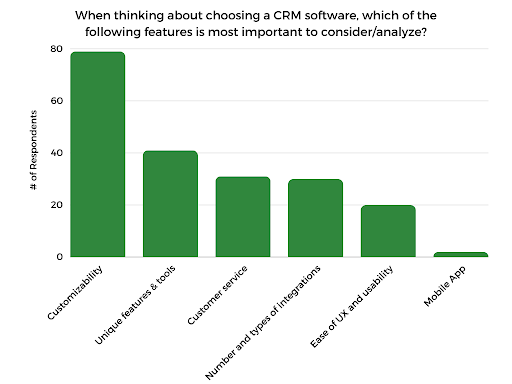
When we surveyed CRM users, respondents identified customization, unique features such as AI tools and customer service as the most important things to consider when evaluating a new CRM. These features can be a good place to start if you’re still determining your exact feature needs. We kept these insights in mind as we evaluated Salesforce and HubSpot to better understand their key differences.
We always recommend taking advantage of free trials yourself to get a sense of what a platform can do. For big-name platforms like Salesforce and HubSpot, free trials are likely just the beginning of what’s possible, considering how many options there are to customize them.
The Bottom Line
Salesforce and HubSpot have plenty to offer for any CRM strategy and are considered among the best CRM software options on the market. Salesforce is worth the investment if you have a large team and can take on the higher price tag. Salesforce has a much more comprehensive range of customization options, though CRM implementation can be intensive, with many organizations choosing to hire consultants to help with the process. If you have specific needs for integration or use cases for customization, then Salesforce may make sense.
Smaller teams or startups that want a quick-to-implement CRM will find HubSpot more intuitive by comparison. If you don’t have extensive customization needs and want to keep your sales and marketing tasks in one platform, HubSpot is a great option. With native functionality marketing campaigns and product bundle options, HubSpot offers some flexibility in your chosen features. However, it won’t provide the same level of customizability as Salesforce. Both tools are more expensive than other CRM options, though costs can vary depending on the plans and add-ons you choose.
Frequently Asked Questions
HubSpot is better for teams that want to balance CRM functionality with ease of use. Salesforce is better for teams willing to take on a more intensive CRM implementation process in exchange for full control and customization over the platform. Salesforce is a great option for teams that expect to scale their CRM usage, as HubSpot’s limits may eventually be problematic. However, smaller teams shouldn’t overlook HubSpot’s free tools. Teams new to CRM can gain more value by using HubSpot.
HubSpot is a competitor to Salesforce in terms of customer relationship management, considering their similar feature offerings, capabilities and pricing models.
Salesforce is HubSpot’s most similar competitor. Both Salesforce and Hubspot offer similar products and functionality.
If you find Salesforce too cumbersome to implement as part of your daily workflow, HubSpot may be a more user-friendly option with similar CRM functionality.
link